
Download SmartMenu 1.0 – restaurant menu, digital menu, menu creator, dining app, food service tool
Overview
SmartMenu 1.0 is a productivity-focused mobile application developed by Joe C. Jones, designed specifically for restaurants, bars, clubs, and other dining venues. The app streamlines the process of creating, organizing, and updating digital menus, addressing the common challenges faced by hospitality operators who rely on manual or outdated methods. By offering a structured platform for menu creation, SmartMenu 1.0 reduces time spent on administrative tasks and enhances the accuracy of dish information. Its core purpose is to empower food service professionals with a tool that supports efficient menu management, from initial setup to ongoing modifications.
Target users include small to medium-sized establishments seeking a low-cost, accessible solution for digital menu organization. The app is particularly useful for venues that frequently update their offerings, such as seasonal menus or daily specials. Real-world use cases range from setting up a new restaurant’s initial menu to adjusting pricing and allergen details in response to ingredient availability. In the broader app ecosystem, SmartMenu 1.0 fills a niche for lightweight, functional tools tailored to niche industries, providing a streamlined alternative to more complex enterprise systems.
The developer, Joe C. Jones, has positioned the app as a practical utility for the hospitality sector. Although no further details about the developer’s background or company history are available, the app’s release date of June 15, 2012, indicates a long-standing presence in the mobile productivity space. This longevity suggests a stable foundation, though the app’s current functionality remains focused on core menu management tasks.
Key Features & Functionality
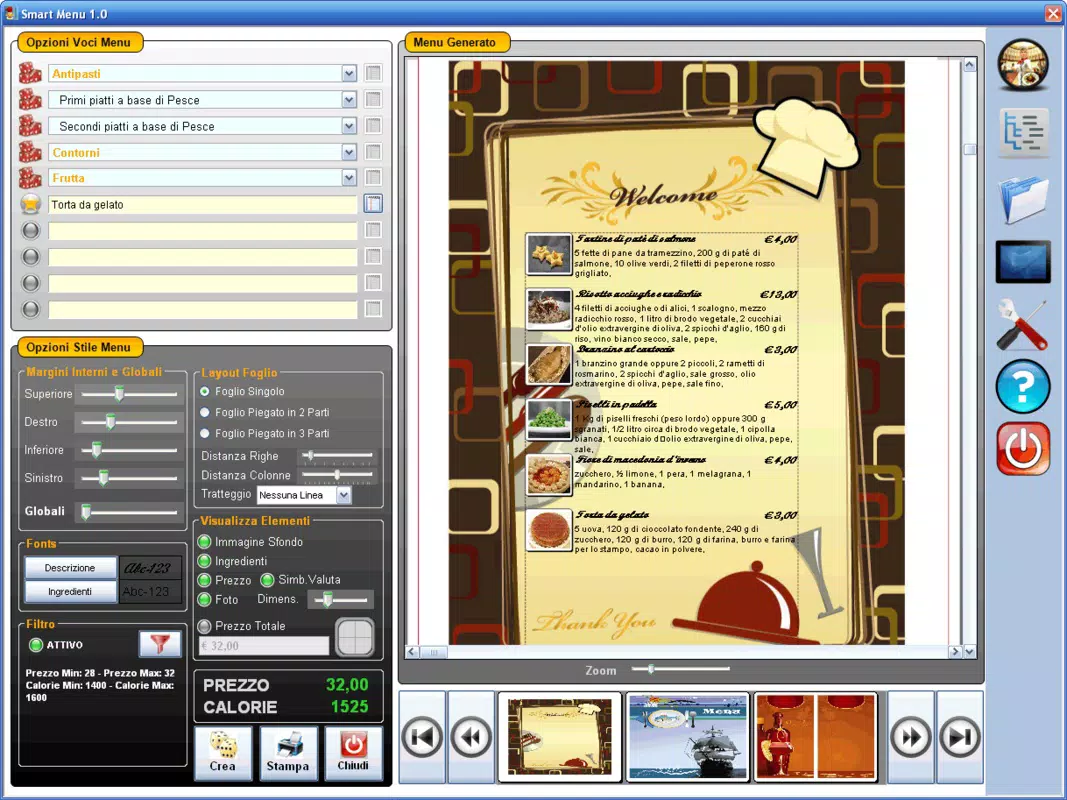
- Customizable Menu Creation: Users can generate personalized menus in minutes by selecting the number of items and inputting key details such as dish names, descriptions, and pricing. This feature supports rapid deployment for new openings or last-minute changes.
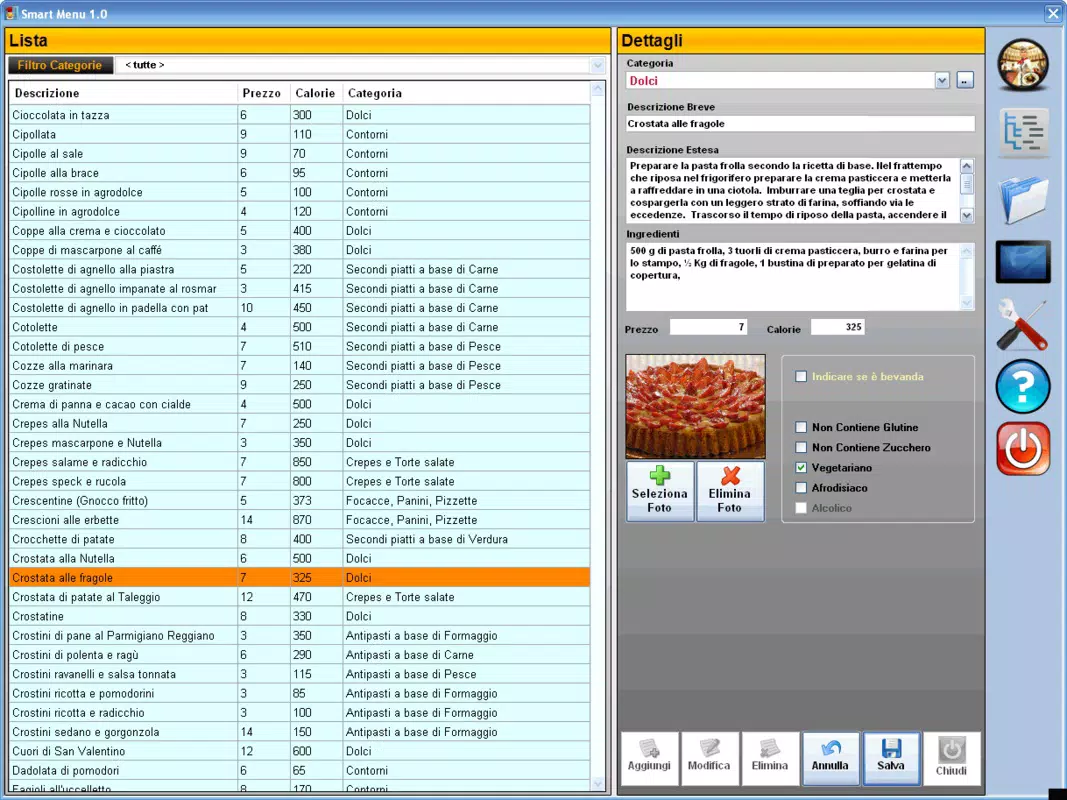
- Comprehensive Database: The app includes a built-in database to store detailed dish information, including ingredients, calorie counts, and allergen alerts. This ensures transparency and helps customers make informed choices.
- Categorization Options: Dishes can be grouped into logical sections like appetizers, main courses, and desserts, improving menu readability and user navigation.
- User-Friendly Interface: Designed with simplicity in mind, the interface allows quick access to tools and functions without requiring technical expertise. This reduces onboarding time and supports consistent usage across staff.
- Efficient Updates and Changes: Modifications such as price adjustments or item additions can be made instantly with minimal steps, ensuring the menu remains current and reflective of real-time inventory or pricing changes.
For example, a café owner can use SmartMenu 1.0 to update daily specials after receiving new ingredient deliveries. A bar manager might quickly add a new cocktail to the menu during a promotional event. The app’s ability to handle frequent changes efficiently makes it ideal for dynamic service environments where agility is essential.
Interface, UX & Performance
SmartMenu 1.0 features a clean, minimalist interface that prioritizes usability over visual complexity. The layout is structured around intuitive navigation, with clearly labeled sections and straightforward input fields. Users can access menu creation, database management, and editing tools through a consistent menu hierarchy, minimizing the need for trial and error.
Navigation flows logically from one task to the next, supporting a seamless user experience. The app’s design emphasizes clarity, using standard icons and text labels to guide users through each step. Although the developer did not list formal performance metrics, the app’s lightweight size of 10 MB suggests optimized resource usage, which may contribute to smooth operation on a variety of Android devices.
Responsiveness appears to be well-balanced, with minimal lag during data entry and menu rendering. Stability is implied by the app’s long-standing availability, though specific reports on crashes or errors were not provided. The app likely performs reliably on mid-range and older Android devices, given its modest file size and age. However, compatibility with newer Android versions has not been explicitly confirmed.
Platform Compatibility & Technical Requirements
SmartMenu 1.0 is available exclusively on the Android platform. The app is compatible with Android devices running the OS version associated with its release in 2012. However, the developer did not specify minimum OS requirements or device compatibility details beyond the platform.
The app has a file size of 10 MB, which is relatively small, indicating efficient code and limited resource demands. This size suggests that the app can be installed and run on devices with limited storage space. While the app is free to download and use, no in-app purchases or subscription models are mentioned.
Although the developer did not list formal technical requirements, the app’s age and lightweight nature imply broad compatibility with older Android devices. However, users should exercise caution when installing on modern systems, as compatibility with newer Android versions cannot be guaranteed without official confirmation.
Pros and Cons
Pros
- Free to download and use, making it accessible for small businesses.
- Lightweight design with a 10 MB file size, suitable for older or low-storage devices.
- Intuitive interface with minimal learning curve for new users.
- Efficient menu creation and editing tools for frequent updates.
- Supports detailed dish information including allergens and calorie counts.
Cons
- Platform availability is limited to Android; no iOS version is currently available.
- Compatibility with modern Android versions has not been confirmed.
- Specific technical requirements, such as minimum OS or device specifications, were not disclosed.
- No information on cloud sync, backup, or multi-device access.
- Limited feature set compared to modern menu management platforms.
FAQ
Is SmartMenu 1.0 safe to download and install?
Yes, the app is free and available through official Android channels. As it was released in 2012 and has a small file size, it is unlikely to contain malicious components. However, users should ensure they download from trusted sources.
Can I use SmartMenu 1.0 on iOS devices?
Currently, the app is only available on Android. There is no official iOS version, and the developer has not announced plans for cross-platform expansion.
Does SmartMenu 1.0 support cloud backup or data syncing?
The developer did not provide information on cloud sync or backup functionality. Users should manually save or export their data if needed.
How often is SmartMenu 1.0 updated?
There is no public information on update frequency. The app was released in 2012, and no recent updates have been documented.
Is SmartMenu 1.0 suitable for large restaurant chains?
While the app supports basic menu management, its simplicity and lack of advanced features may limit its effectiveness for large-scale operations requiring multi-location coordination or real-time data sharing.
Final Thoughts
SmartMenu 1.0 remains a functional tool for small hospitality businesses seeking a straightforward solution for digital menu creation. Its lightweight design, free access, and user-friendly interface make it a viable option for operators with basic needs. While the app lacks modern features such as cloud integration and multi-device support, its core functionality continues to serve its intended purpose.
For restaurant owners, bar managers, or club operators who prioritize simplicity and cost-effectiveness, SmartMenu 1.0 offers a practical entry point into digital menu management. Its long-standing presence in the Android ecosystem reflects reliability, even if it hasn’t evolved with current technology trends.
Despite its age, the app still delivers value to users who need a no-frills, easy-to-use menu creator. For those looking for a secure, accessible, and efficient tool to manage their dining venue’s offerings, SmartMenu 1.0 remains a relevant choice.
Download SmartMenu 1. now


